Linked IP and DDNS
Plain DNS over IPv4 goes to shared anycast addresses and carries nothing that names your profile. opdns recognises it by the source address: if the query comes from a public IPv4 address linked to your profile, the profile applies. Everything else sent to those addresses is the public path: answered, unfiltered, not logged.
Use this only for devices or routers that cannot do encrypted DNS or IPv6.
- IPv4 only, public unicast only. Private (
192.168.x.x,10.x.x.x), carrier-grade NAT (100.64.0.0/10) and reserved addresses are refused. - An address can be linked to one profile only. Linking an address that another profile holds fails with a conflict; nothing is moved silently.
- Everyone behind that address shares the profile: housemates, guests, and, on carrier-grade NAT, possibly strangers. If your ISP puts you behind CGNAT, your router’s WAN address is not your public address and linking will not work reliably; use IPv6 or encrypted DNS.
- No device names. All devices on the network appear without a name.
Link your network
Section titled “Link your network”-
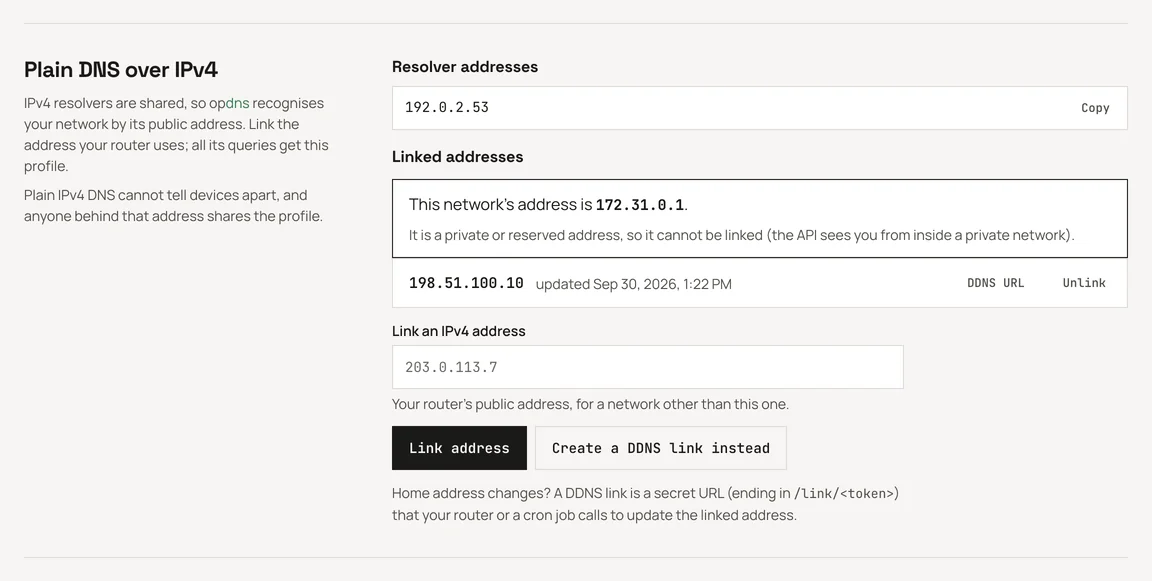
From a device on the network, open the profile’s Setup page in the dashboard. Under Plain DNS over IPv4, it shows the address it sees you from.
-
Click Link this network. The dashboard shows a DDNS URL for the link once; copy it now if your address can change.
-
To link a network you are not on, type its address in Link an IPv4 address instead.
Keep it current with DDNS
Section titled “Keep it current with DDNS”Home IPv4 addresses change. Each link has a secret DDNS URL; calling it from the network moves the link to the caller’s current IPv4 address.
https://ip.opdns.net/link/<ddns-token>You can also create an empty slot with Create a DDNS link instead and let the first call fill it. Show or regenerate a link’s URL with the DDNS URL button; regenerating stops the old URL at once.
From a machine on the network (cron)
Section titled “From a machine on the network (cron)”# every 5 minutes; -4 makes sure the call leaves over IPv4*/5 * * * * curl -4 -fsS https://ip.opdns.net/link/<ddns-token> >/dev/nullThe -4 matters on dual-stack networks: over IPv6 the update is refused
(badip), since only IPv4 addresses can be linked.
From an OpenWrt router
Section titled “From an OpenWrt router”Install ddns-scripts and add a custom service whose update URL is the DDNS
URL; the router calls it whenever its WAN address changes. Force IPv4
(option use_ipv6 '0').
Answers
Section titled “Answers”The DDNS host answers in plain text, like other dynamic-DNS services:
| Answer | Meaning |
|---|---|
good <ip> |
the link now points at <ip> |
nochg <ip> |
already <ip>, nothing changed |
badip <ip> |
not a public IPv4 address (called over IPv6, or from a private network) |
badauth |
unknown token (regenerated or unlinked) |
conflict <ip> |
<ip> is linked to another profile; nothing changed |
abuse |
rate limited; call less often |
Keep the URL secret: anyone who has it can point your link at their own address and use your profile.