Profiles
A profile is one filtering policy with its own id, addresses, rules, settings and logs. An account can have several. Every change you make is saved as a new version of the profile and reaches every PoP within seconds.
Switch and create
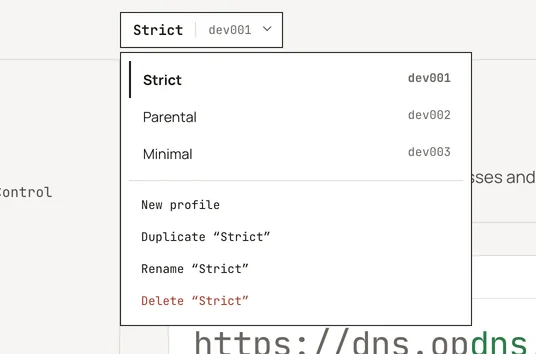
Section titled “Switch and create”The profile switcher at the top of the dashboard lists your profiles. Choose New profile there to create one; the dashboard assigns its id.
Each profile’s pages follow the same order:
| Page | What it holds |
|---|---|
| Setup | the profile’s addresses and linked IPs (Your endpoints), and whether the device you are on uses them (Check it works) |
| Security | protections against malicious domains (Security) |
| Privacy | blocklists for ads and trackers (Privacy blocklists) |
| Parental Control | categories, services, SafeSearch (Parental control) |
| Denylist, Allowlist, Rewrites | your own rules (Rules) |
| Analytics | totals, timelines, top lists (Analytics) |
| Logs | live tail and search (Logs) |
| Settings | block answers, logging, resolution (Settings) |
| Nodes | self-hosted nodes (Nodes) |
| Devices | devices seen on the profile (Devices) |
Devices
Section titled “Devices”A device is known by the name it puts in its encrypted DNS address (device names). There is nothing to register: the first query with a new name creates it, and logs and analytics group by it. Rename or forget devices on the Devices page.
Concurrent edits
Section titled “Concurrent edits”Every profile resource carries its version as an ETag. If you edit the same
profile in two tabs, the second save is refused with a message to reload
rather than silently overwriting the first. The API works the same way
(If-Match, see Errors and limits).
Suspended profiles
Section titled “Suspended profiles”The opdns operators can suspend a profile, for example while they look into abuse. A suspended profile keeps answering: its addresses, linked IPs and devices still resolve, so nothing on your network breaks. What changes until it is reinstated:
- No filtering. Queries resolve as if the profile had no rules, lists, rewrites, security or parental settings. Operator blocks for legal orders and abuse still apply, as they do for everyone.
- No logging. No query record and no hourly count is written for it, in the cloud or on an enrolled node. Logs already stored stay readable and expire with their retention as before.
- No changes. Every page that configures filtering (Security, Privacy,
Parental Control, Denylist, Allowlist, Rewrites, Settings) is shown
read-only, and the API answers changes to the profile, its devices and
new nodes with
409 profile_suspended. The profile cannot be deleted meanwhile. Setup, Analytics, Logs, Nodes and Devices stay available to read; you can still revoke a node and send list reports.
Every page of the profile shows a banner: This profile is suspended by the operator; it resolves without filtering until it is reinstated, with a note to contact support if you think it is a mistake. The suspension and the reinstatement each appear in Activity (Profile suspended by the operator, Profile reinstated by the operator). The operator records a reason, but it is internal and is not shown in the dashboard, the API or your data export.
An enrolled self-hosted node receives the suspension like any profile change and resolves unfiltered too. A node older than this feature refuses the new profile document and keeps filtering with the last one it had.
How operators suspend and reinstate a profile: Administration.